

Online patent filing is the process of submitting patent applications and related correspondence electronically to the USPTO, primarily through USPTO Patent Center, the agency's current unified web-based portal. You skip the paper stack, get an immediate electronic receipt, and establish your filing date the moment you hit submit.
Three things to know before you read further:
- Filing online locks in your priority date instantly. The electronic receipt Patent Center generates is legally binding proof of your submission date and time.
- Filing by mail costs you $400 more. Regular nonprovisional utility applications submitted by mail or hand-delivery trigger a $400 non-electronic filing surcharge that electronic filing avoids entirely. Small entities pay $200; micro-entity rates are lower still.
- Know your portals. USPTO Patent Center is the primary filing system today. EFS-Web was its predecessor and remains referenced in legacy guidance, but Patent Center handles the full workflow now. Everything lives at USPTO.gov. Tools like Patent Public Search support your pre-filing research, and Inventifystudios helps inventors prepare DOCX-ready drafts before they touch the live system.
Key Takeaways
Online patent filing through USPTO Patent Center is the fastest, most cost-effective path to establishing a U.S. priority date, and preparation before submission determines whether that filing holds up under examination.
| Point | Details |
|---|---|
| Primary portal | USPTO Patent Center is the current unified system for filing, managing, and tracking U.S. patent applications electronically. |
| Identity verification | Complete ID.me online verification (roughly 30 minutes) before your deadline; paper verification takes 5–10 business days. |
| Fee savings | Filing electronically avoids the $400 non-electronic surcharge for regular nonprovisional utility applications; using DOCX avoids the non-DOCX surcharge. |
| DOCX requirement | As of January 17, 2024, the description, claims, and abstract for nonprovisional utility applications must be filed in DOCX format. |
| When to get help | Provisional filings may be DIY; complex claims or commercial-critical inventions should involve a registered patent practitioner. Inventifystudios prepares DOCX-ready drafts to reduce preparation time before filing or engaging counsel. |
Table of Contents
- What is online patent filing, step by step?
- How do you create your USPTO account and verify your identity?
- Which documents and file formats does Patent Center require?
- How much does online patent filing cost, and how do entity discounts work?
- What happens after you submit your patent application?
- How does Patent Center catch errors before you submit?
- How does online filing differ by application type?
- When should you hire a patent attorney instead of filing yourself?
- An editorial perspective on what online patent filing actually demands
- How Inventifystudios helps you arrive at Patent Center ready to file
- Sources
What is online patent filing, step by step?
The online patent application process follows a clear sequence. Work through each stage before moving to the next, and you will avoid the most common submission errors.
-
Run a prior-art search first. Use Patent Public Search and WIPO PATENTSCOPE to identify existing patents that might block yours. A clean search result also helps you draft stronger, narrower claims. For a deeper look at search tools, the patent search tools guide for inventors covers the major options side by side.
-
Create a USPTO.gov account. Go to USPTO.gov and register. This account is the gateway to Patent Center and every other USPTO digital service.
-
Verify your identity and self-enroll in Patent Center. Complete identity verification through ID.me (online, about half an hour) or submit a paper form (taking multiple business days). Once verified, self-enroll as a registered Patent Center user.
-
Prepare your documents. For a nonprovisional utility application, you need a specification (description, claims, and abstract) in DOCX format, drawings in PDF, an Application Data Sheet (ADS), and an oath/declaration. See Section 4 for format details.
-
Open Patent Center and start a new application. Select the correct application type (provisional, nonprovisional utility, design, or PCT national stage). Use Patent Center's training mode for a dry run before going live.
-
Upload your files. Drag and drop your DOCX specification, PDF drawings, ADS, and declaration. Patent Center runs immediate validation checks on file type, size, and required fields.
-
Pay your fees. Include filing, search, and examination fees at submission. Pay by credit/debit card or electronic funds transfer. Paying late triggers surcharges.
-
Submit and save your receipt. Patent Center generates a separate submission receipt and a payment receipt. Save both. The submission receipt is your proof of filing date.
-
Track your application. Log into Patent Center with your registered account to view status updates and official correspondence as your application moves through examination.
Pro Tip: Before your first live submission, run a complete dry run in Patent Center's training mode using your actual DOCX and PDF files. Validation errors surface there, not after you've paid.
How do you create your USPTO account and verify your identity?
Getting your account and identity verification done early prevents last-minute delays when a deadline is approaching.
Accounts you need:
- A USPTO.gov account (free, created at USPTO.gov) — required for all Patent Center access.
- Patent Center registration — completed after your USPTO.gov account is active; this is the self-enrollment step that grants you registered-user privileges.
Two identity-verification paths:
- ID.me online verification: Takes roughly 30 minutes. You verify your identity digitally through the ID.me platform integrated into USPTO.gov; this is the faster route and advisable when facing imminent deadlines.
- Paper verification form: You submit a physical form to the USPTO. Processing typically runs 5–10 business days. Use this only when you have ample lead time.
USPTO guidance on getting started explains both paths in detail.
What registered status gives you:
- View private application documents and correspondence in Patent Center.
- File follow-on correspondence (responses, amendments, petitions) electronically.
- Use text filing for specification, claims, abstract, and drawings.
- Access drag-and-drop uploads and receive separate submission and payment receipts.
Unregistered users can file certain new applications through Patent Center, but they cannot view private application data or submit follow-on documents electronically. Registration is worth the 30-minute investment.
Pro Tip: If your provisional or nonprovisional filing deadline is within a week, choose ID.me online verification. Paper processing can take up to 10 business days, which may push you past a critical window.

Which documents and file formats does Patent Center require?
Patent Center accepts DOCX, PDF, TXT, and XML uploads, but the format rules vary by document type. Getting this wrong triggers either a validation error or a fee surcharge.
Documents required for a typical nonprovisional utility application:
- Specification (description, claims, and abstract) — DOCX required as of January 17, 2024
- Drawings — PDF
- Application Data Sheet (ADS) — PDF or fillable form
- Oath/Declaration (or substitute statement) — PDF; see the inventor declaration form guide for submission details
- Sequence listing (if applicable) — TXT or XML (ST.26 format)
Format and size rules:
| Document | Required Format | Notes |
|---|---|---|
| Specification (description, claims, abstract) | DOCX | Single file upload; non-DOCX triggers a surcharge |
| Drawings | Must be clear and legible; scanned images often fail validation | |
| ADS | Use USPTO fillable ADS form | |
| Oath/Declaration | Or substitute statement | |
| Sequence listing | TXT or XML | ST XML preferred for new filings |
Patent Center enforces per-document file-size limits and caps on the number of uploaded files. The Patent Center User Guide lists current limits; check it before you upload large drawing sets.
Filing the full specification as a single DOCX reduces the risk of section-separation errors that occurred when filers uploaded description, claims, and abstract as separate PDFs. One file, one upload, one validation pass.
Pro Tip: Use Patent Center's training mode to upload your actual files before going live. The system flags format mismatches and size violations immediately, so you can fix them without affecting a real application.
How much does online patent filing cost, and how do entity discounts work?
Fees depend on application type, entity size, and how you file. Filing electronically is the single most reliable way to keep costs down.
The $400 non-electronic surcharge: Regular nonprovisional utility applications filed by mail or hand-delivery incur a $400 non-electronic filing fee ($200 for small entities). Filing through Patent Center eliminates this charge entirely.
The non-DOCX surcharge: Submitting a nonprovisional utility specification in PDF instead of DOCX triggers an additional surcharge. USPTO guidance effective January 17, 2024 specifies the amounts and entity-based reductions. Small and micro entities pay reduced rates.
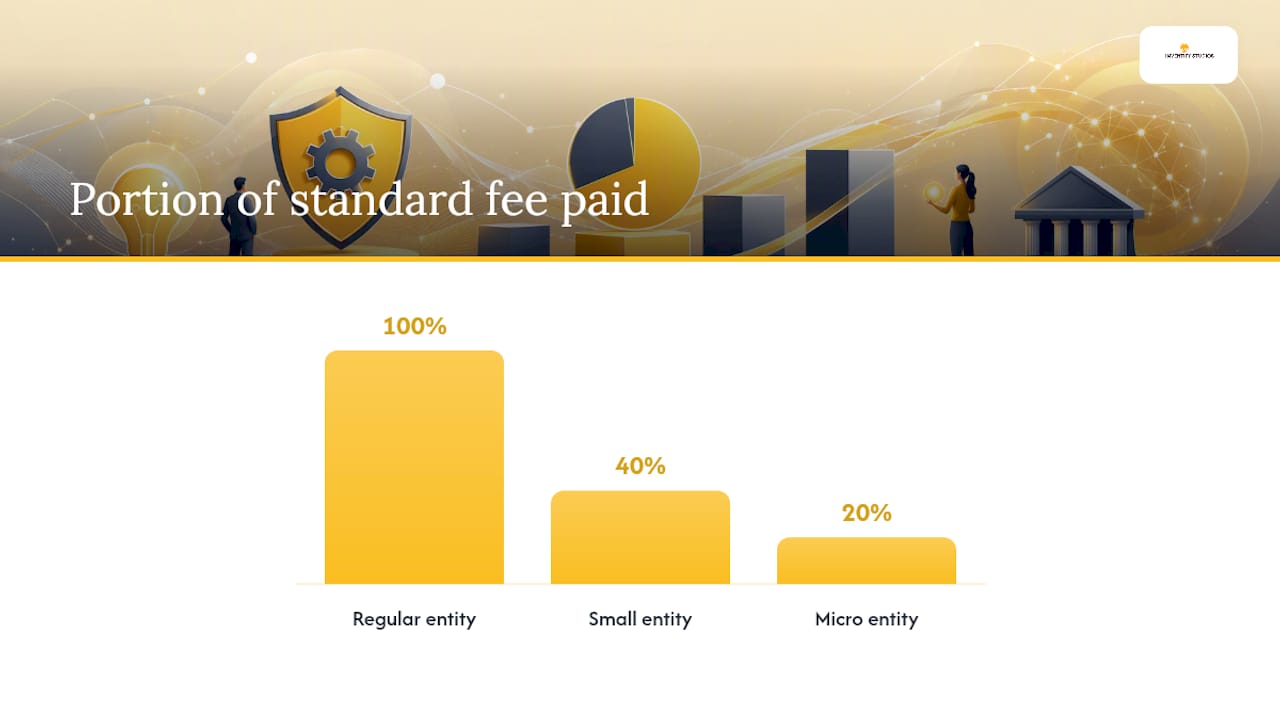
Entity-size discounts: The USPTO offers two tiers of reduced fees:
- Small entity: Qualifies if the applicant is an independent inventor, a small business (under 500 employees), or a nonprofit. Fees are reduced by 60%.
- Micro entity: Qualifies under stricter income and prior-filing limits. Fees are reduced by 80%.
Claim the correct entity status on your ADS before submitting. Overclaiming small or micro status is a serious error with legal consequences.
Common fee categories for a nonprovisional utility application:
| Fee Type | Purpose | Payment Timing |
|---|---|---|
| Basic filing fee | Required at submission | Due at filing |
| Search fee | Covers USPTO prior-art search | Due at filing |
| Examination fee | Covers substantive review | Due at filing |
| Non-electronic surcharge | Applies if filed by mail/hand-delivery | Avoided by filing online |
| Non-DOCX surcharge | Applies if spec filed in PDF | Avoided by using DOCX |
| Late payment surcharge | Applies if fees paid after filing date | Avoided by paying at submission |
Pay online via credit/debit card or electronic funds transfer. USPTO filing guidance recommends including all three core fees (filing, search, examination) at submission to avoid late-payment surcharges. Deposit accounts are also accepted for high-volume filers.
What happens after you submit your patent application?
Submission is the beginning of a multi-year process. Here is what to expect at each stage.
Post-filing milestones:
- Filing receipt: Patent Center issues an electronic submission receipt immediately. This is your proof of filing date. Save it.
- Pre-grant publication: Most nonprovisional utility applications publish 18 months after the earliest effective filing date. You receive a notice; the application becomes publicly visible in Patent Public Search.
- Examination queue: A USPTO examiner reviews your application. Wait times vary by technology area, but utility applications often take 18–24 months to reach first action.
- Office Action: The examiner may issue a non-final Office Action with rejections or objections. You typically have three months to respond (extendable up to six months with surcharges).
- Final rejection or allowance: After your response, the examiner issues a final rejection (triggering further options like RCEs or appeals) or a Notice of Allowance.
- Issue fee: Once allowed, you pay an issue fee within three months. The patent then issues.
Provisional-specific timing: A provisional application is never examined and never publishes. It gives you 12 months to file a corresponding nonprovisional application that claims its priority date. Missing that 12-month window means losing the provisional's benefit permanently.
Tracking your application: Registered Patent Center users can view status updates, read official correspondence, and download documents directly from their dashboard. Unregistered filers must use public-facing tools and cannot access private application data.
Responding to Office Actions on time is critical. Calendar every deadline the moment you receive USPTO correspondence, and build in time for drafting a substantive reply.
How does Patent Center catch errors before you submit?
Patent Center runs validation checks the moment you upload a file. These checks flag problems before your application enters the USPTO queue, which is far better than discovering an error after submission.
Common filing errors Patent Center validation catches:
- Wrong file format (PDF instead of DOCX for a nonprovisional specification)
- Files exceeding per-document size limits
- Missing required fields in the ADS
- Illegible or low-resolution drawings
- Mismatched inventor names between the ADS and declaration
Errors Patent Center does not catch automatically:
- Missing oath/declaration (you may submit without it initially, but a Notice of Incomplete Application follows)
- Incorrect entity-status claims
- Mismatched applicant names between documents
- Missing fees (Patent Center will flag unpaid fees, but it is your responsibility to confirm all required fees are included)
What to do when validation throws an error: Read the error message carefully. Most format errors resolve by converting your file to the correct type and re-uploading. Size errors require compressing drawings or splitting large sequence listings. If Patent Center rejects a file and you cannot resolve it before a deadline, contact the USPTO Electronic Business Center.
Correcting errors after submission:
- Notice of Incomplete Application: Respond within the time period specified in the notice. Missing documents can often be submitted as a reply.
- Amendments: File a formal amendment to correct specification or claim errors during examination.
- Petitions: Use a petition when you need to correct a procedural error or request special consideration.
Pro Tip: Never submit a live application without first checking that your DOCX specification opens cleanly in Microsoft Word and that your PDF drawings are vector-based, not scanned images. Scanned drawings frequently fail Patent Center's legibility checks.
How does online filing differ by application type?
The core Patent Center workflow is the same across application types, but each type has specific requirements worth knowing before you start.
Provisional application:
- Establishes a priority date without formal examination.
- Required documents: specification (description), drawings (recommended), and cover sheet. No claims or oath/declaration required.
- DOCX is not mandatory for provisionals, but using it keeps your draft consistent when you convert to a nonprovisional.
- Critical deadline: You have exactly 12 months from the provisional filing date to file a nonprovisional that claims its benefit. No extensions exist.
- For a practical look at protecting your invention without a law firm, provisionals are often the starting point.
Nonprovisional utility application:
- Full examination application. DOCX is required for the specification (description, claims, abstract) as of January 17, 2024.
- Requires filing, search, and examination fees at submission.
- ADS, oath/declaration, and drawings (if applicable) are required. See the utility patent application walkthrough for a deeper preparation guide.
Design application:
- Protects the ornamental appearance of a product, not its function.
- Drawings are the core of a design application. They must be high-quality, consistent in view angles, and meet USPTO drawing standards precisely.
- No separate claims section beyond a single claim referencing the drawings.
PCT/national-stage filing:
- Patent Center supports national-stage entry (35 U.S.C. § 371) for PCT applications entering the U.S.
- For international prior-art searching and PCT application research, WIPO PATENTSCOPE is the primary tool.
- Country-specific instructions for PCT filings vary; consult USPTO's PCT resources and the receiving office instructions for each target country.
Sequence listings: If your invention involves nucleotide or amino acid sequences, you must file a sequence listing in ST.26 XML format. Large sequence listings have specific size and submission rules; check the Patent Center User Guide before uploading.
When should you hire a patent attorney instead of filing yourself?
Filing online yourself is technically possible for any inventor. Whether it is strategically wise depends on what you are protecting and what is at stake.
DIY filing is reasonable when:
- You are filing a provisional application to lock in a priority date while you continue development.
- The invention is straightforward, the commercial stakes are low, and you understand the technology well enough to describe it clearly.
- You have done a prior-art search and found a relatively clear field. The patentability criteria guide explains what novelty and nonobviousness mean in practice.
Hire a registered patent attorney or agent when:
- Your invention is a complex system, software, or method with multiple interacting components.
- You are entering a crowded technology field where claim scope and claim language determine whether your patent has real defensive value.
- You have received an Office Action and need to argue patentability against prior-art rejections.
- Commercial partners, investors, or licensing deals depend on the strength of your claims. A patent with weak claims is a document, not an asset.
How practitioners interact with Patent Center: Registered patent attorneys and agents have eFiler privileges in Patent Center. They can file on behalf of clients, view private application data, and submit all correspondence electronically. If you hire counsel after filing a provisional yourself, they can take over the nonprovisional filing and prosecution.
Inventifystudios can help you prepare DOCX-ready draft materials, run an automated prior-art search, and generate a structured specification before you engage an attorney. That preparation reduces billable hours and gives counsel a stronger starting point. For AI-assisted tools that support this kind of pre-filing workflow, the best AI tools for startup founders resource covers options worth knowing.
Pro Tip: Even if you plan to hire an attorney, run your own prior-art search first using Patent Public Search. Attorneys charge by the hour; arriving with a documented search saves time and gives you a more informed conversation about claim strategy.
An editorial perspective on what online patent filing actually demands
Most guides treat Patent Center as the hard part. It is not. The portal is well-designed, the training mode works, and the validation checks catch most format errors before they cost you anything. What actually trips inventors up is the work that happens before they open a browser.
The DOCX requirement for nonprovisional specifications is a good example. The rule has been in effect since January 17, 2024, yet inventors still arrive at Patent Center with PDF specifications, pay the surcharge, and wonder what went wrong. The fix is not technical. It is preparation: write your specification in an editable format from day one, know the format rules before you draft, and run a training-mode submission before you go live.
The same logic applies to prior-art searches. Skipping the search to save time is a false economy. An examiner will find the prior art. The question is whether you found it first and drafted claims that distinguish your invention from it. Inventors who search early write better applications.
The $400 non-electronic surcharge is another avoidable cost that shows up repeatedly in conversations with first-time filers. Filing electronically is not a preference. For nonprovisional utility applications, it is the financially rational choice, full stop.
Where I think the conventional wisdom falls short is in how it frames the attorney question. Most guides say "hire an attorney for complex inventions." That is true but incomplete. The better frame is: hire an attorney when the value of the patent depends on claim scope, and prepare as much as you can before that conversation starts. A well-organized specification, a documented prior-art search, and a clear description of what makes your invention different will make every hour of attorney time more productive.
How Inventifystudios helps you arrive at Patent Center ready to file
The gap between having an invention and having a Patent Center-ready submission is where most inventors lose time and money. Inventifystudios closes that gap before you touch the live filing system.

The platform runs an automated prior-art search, generates a DOCX-formatted specification draft, and produces a 3D prototype visualization so you can validate your concept before committing to filing fees. The marketability analysis and funding preparation tools give you a fuller picture of whether the invention is worth pursuing at the nonprovisional level. Every output is structured for Patent Center compatibility: DOCX for the specification, organized documentation for the ADS and declaration workflow.
Inventifystudios prepares filing-ready materials. It does not replace a patent attorney for claim drafting or legal prosecution strategy. For complex inventions or commercial-critical filings, pair the platform's draft output with a registered practitioner's review.
Start with the Invention Detail flow to run a prior-art check, generate your DOCX draft, and see your concept as a 3D prototype before you open Patent Center.
Sources
- Applying for Patents
This article is general information, not a substitute for advice from a qualified lawyer. Consult a qualified legal professional about your own circumstances before acting on anything here.